🎓 Loan Planning

Student Loan
Payoff Optimizer

🌐 Web app + 📊 Excel workbook

Estimate and compare IBR, RAP, PSLF and Standard plans side-by-side — see which may have the lowest estimated cost and how extra payments could affect your payoff timeline. One purchase gets you both: the web app and the same calculator as an Excel file you keep.

$9.99one-time payment · instant access
Get both versions →

🔒 Secure checkout via Gumroad · Card or PayPal · Instant download

🎓 Student Loan Payoff Optimizer

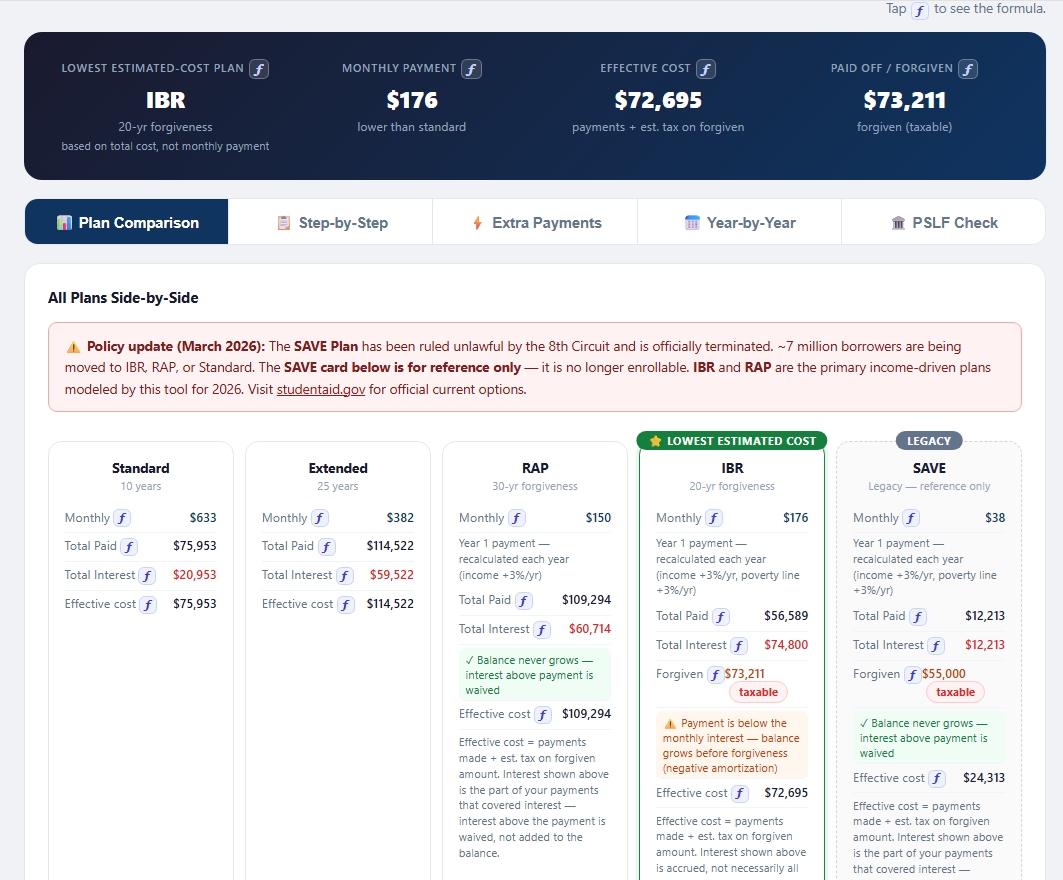
Sample result — $55K loan, 6.8% rate, $45K income

Tap ƒ to see the formula.

Lowest Cost
IBR
20-yr forgiveness
Monthly
$176
vs $633 standard
Effective Cost
$72,695
incl. tax on forgiven
Forgiven
$73,211
at year 20
IBR LOWEST COST
Monthly$176
Total paid$56,589
Forgiven$73,211
Standard
Monthly$633
Total paid$75,953
Interest$20,953
RAP
Monthly$150
Total paid$109,294
Interest$60,714
Extended
Monthly$382
Total paid$114,522
Interest$59,522

📊Also included: the Excel workbook — the same inputs and plan comparison, plus step-by-step math, extra payments, a year-by-year table and a PSLF check, all as live formulas. Change a blue cell and everything recalculates.
Web app preview
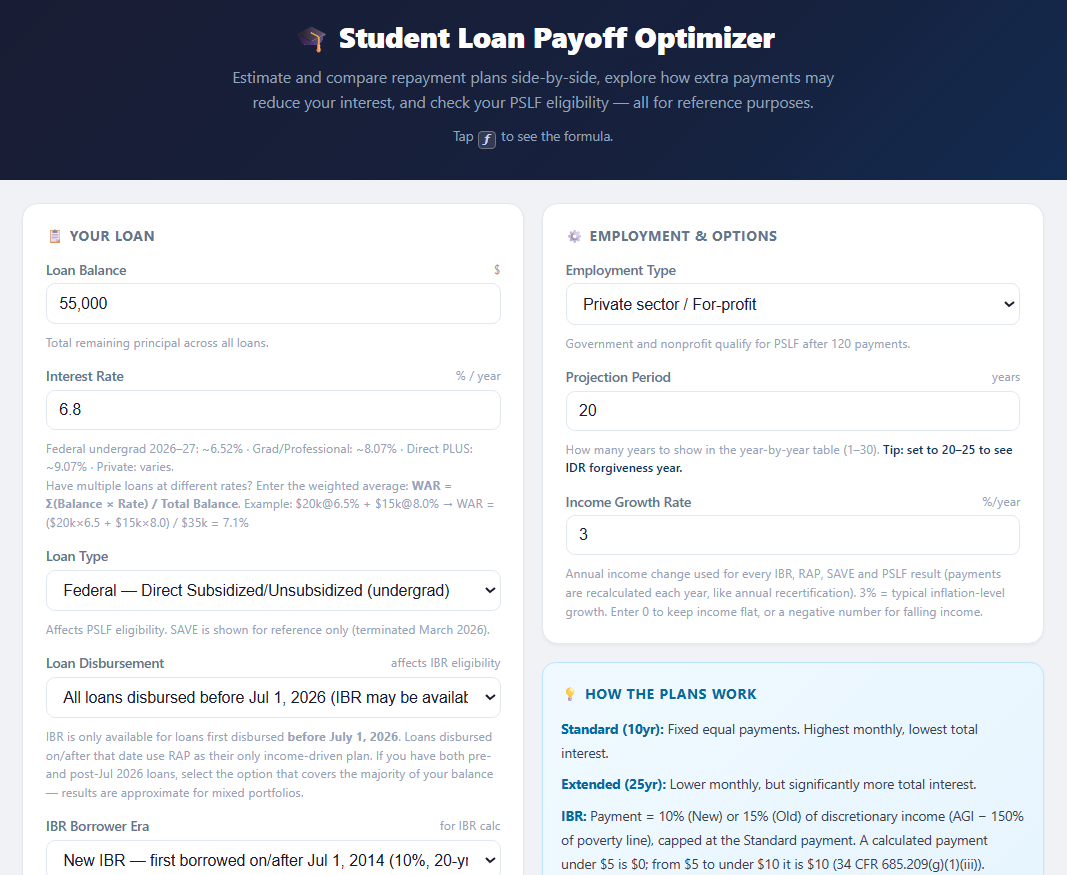
Loan and employment inputs
Start with your loan — balance, rate, loan type and disbursement date — plus employment type and projection period.
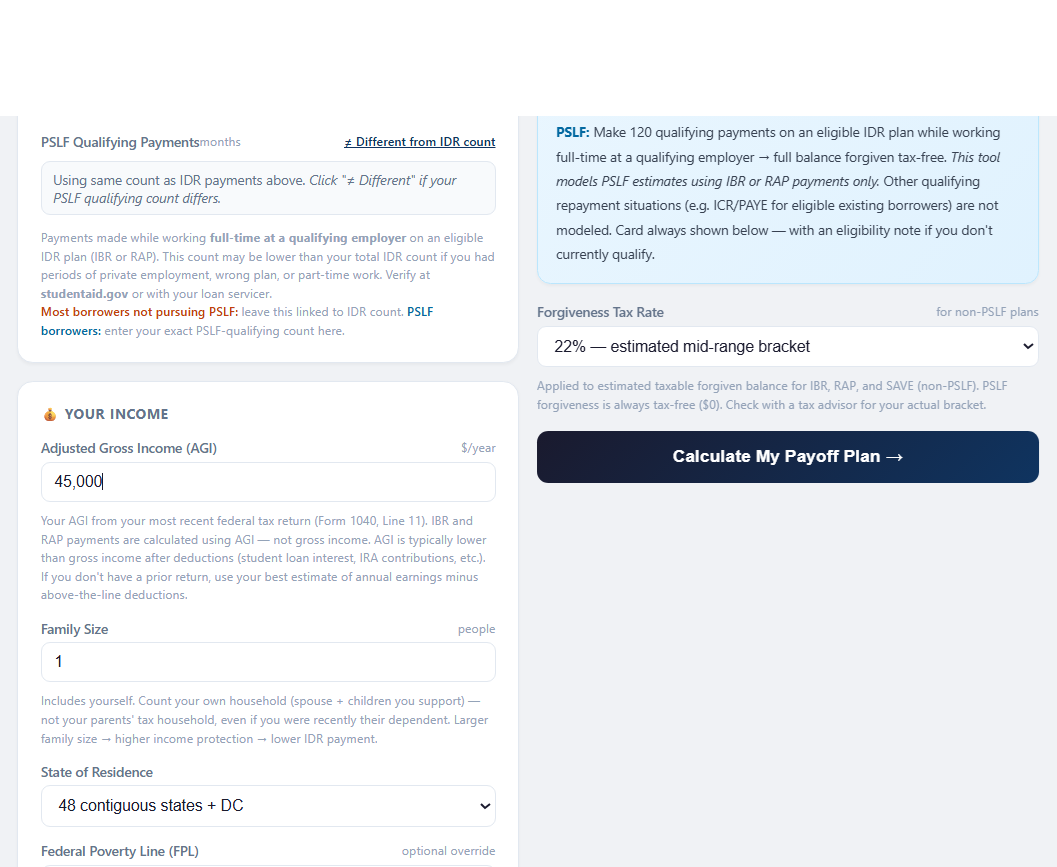
Income inputs
Add your income (AGI), family size and state — the inputs that set IBR and RAP payments.
Plan comparison
$55K at 6.8%: every plan side by side — IBR has the lowest estimated cost at $72,695.
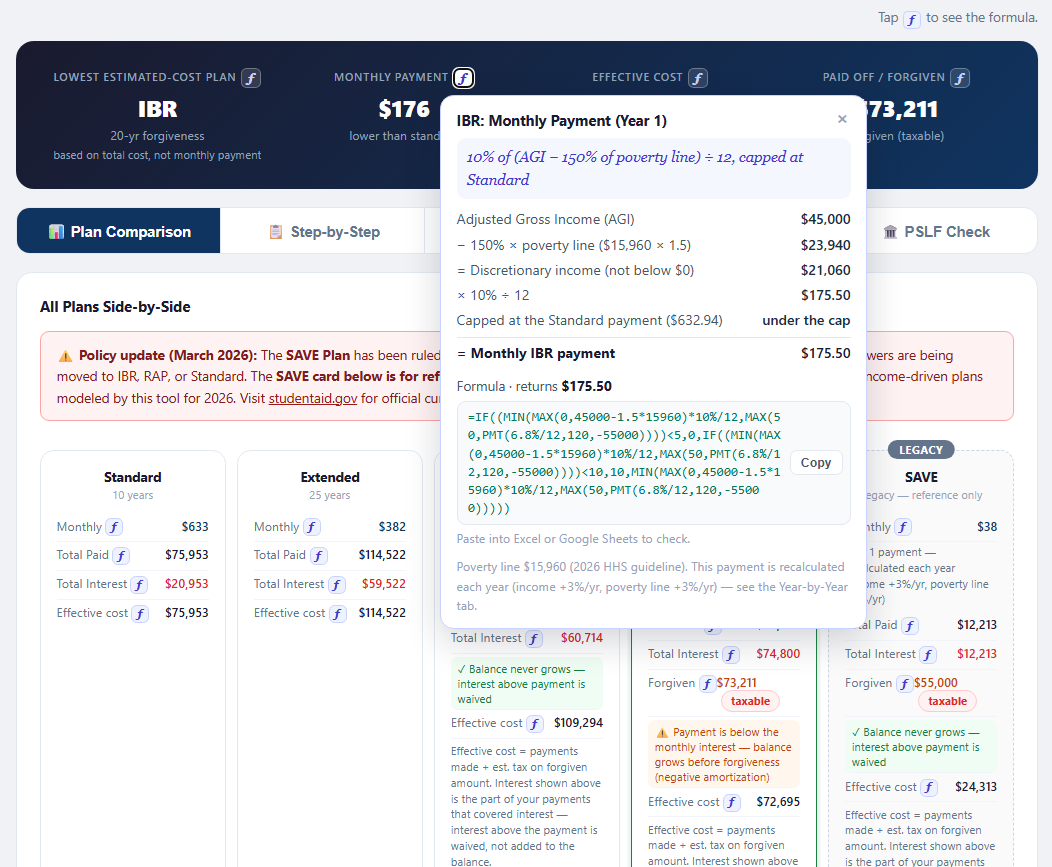
Formula popup for IBR monthly payment
Tap ƒ next to any result to see how it's calculated — IBR $175.50/mo, step by step, with a formula to copy.
Where your money goes and payoff tips
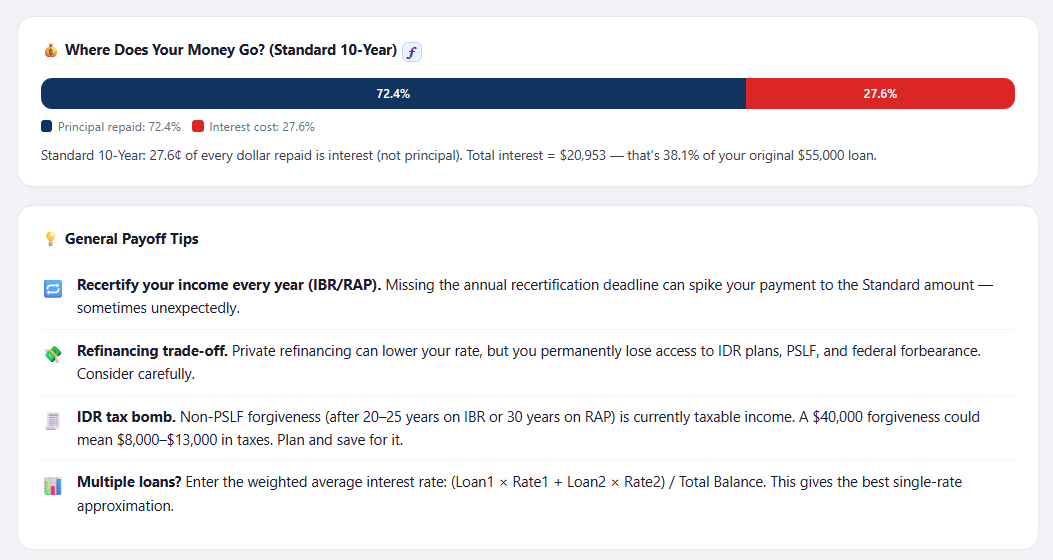
On Standard, 27.6¢ of every dollar repaid goes to interest — plus general payoff tips.
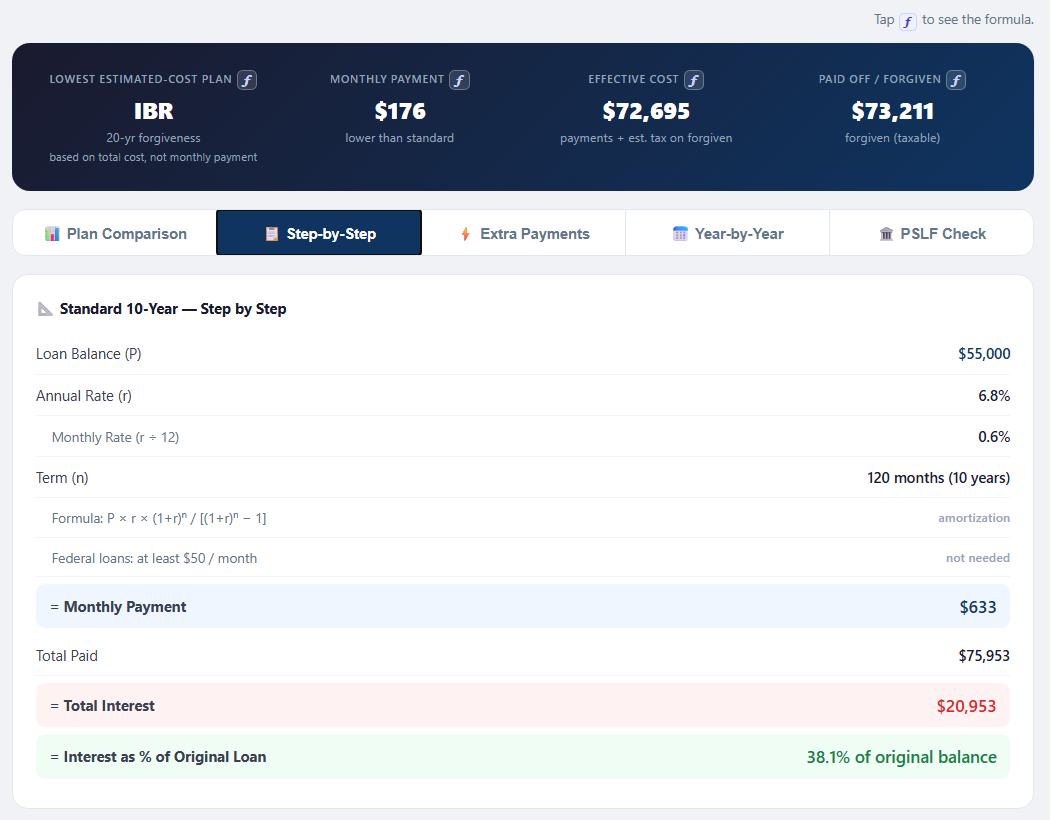
Standard step by step
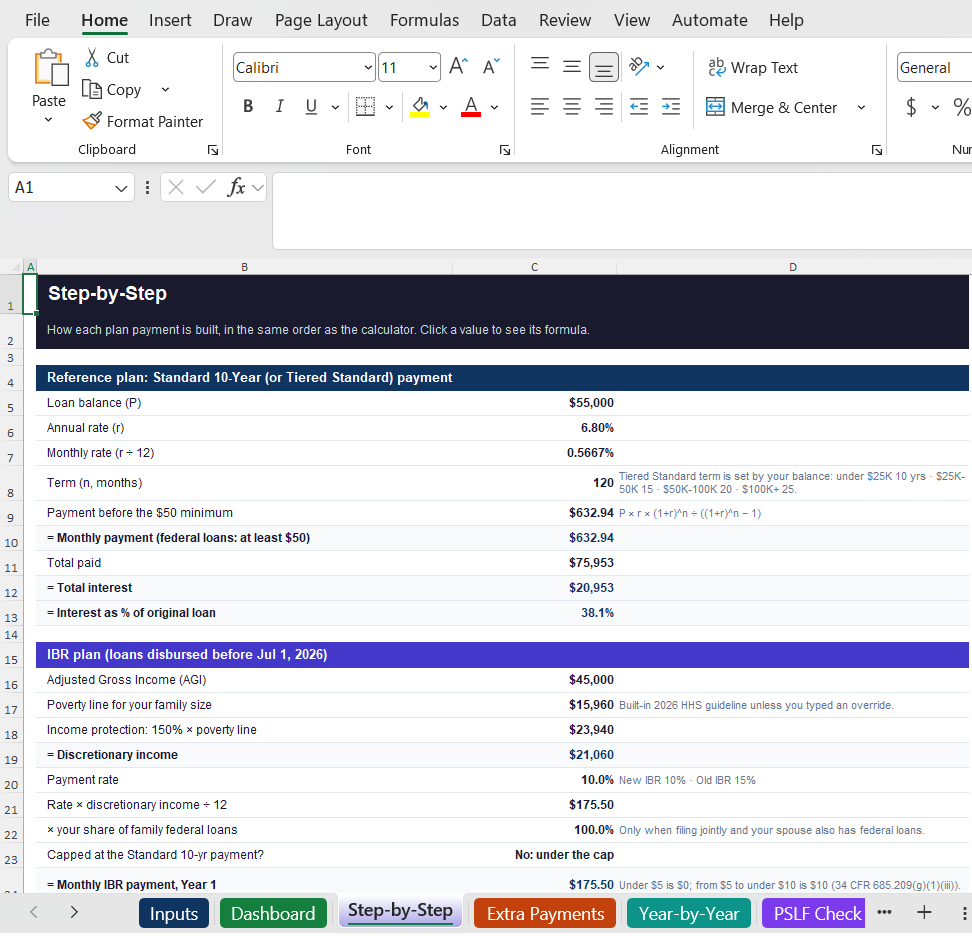
Standard step by step: $633/mo, $20,953 in interest — 38.1% of the original loan.
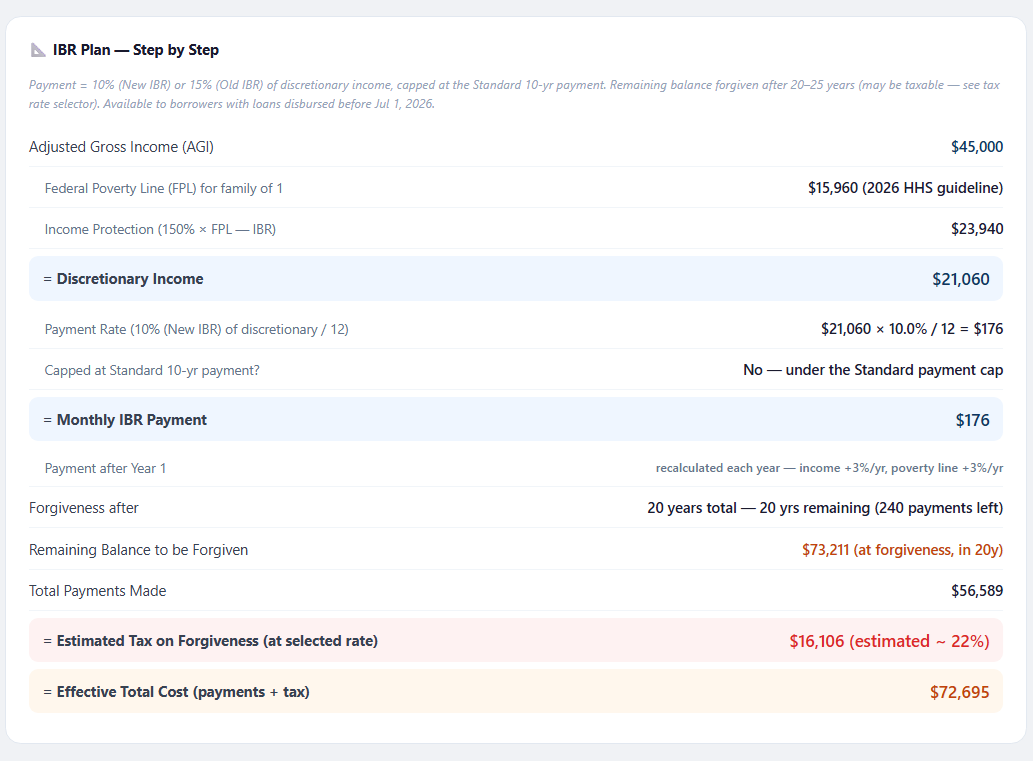
IBR step by step
IBR step by step: $176/mo, $73,211 forgiven after 20 years — and the estimated tax that comes with it.
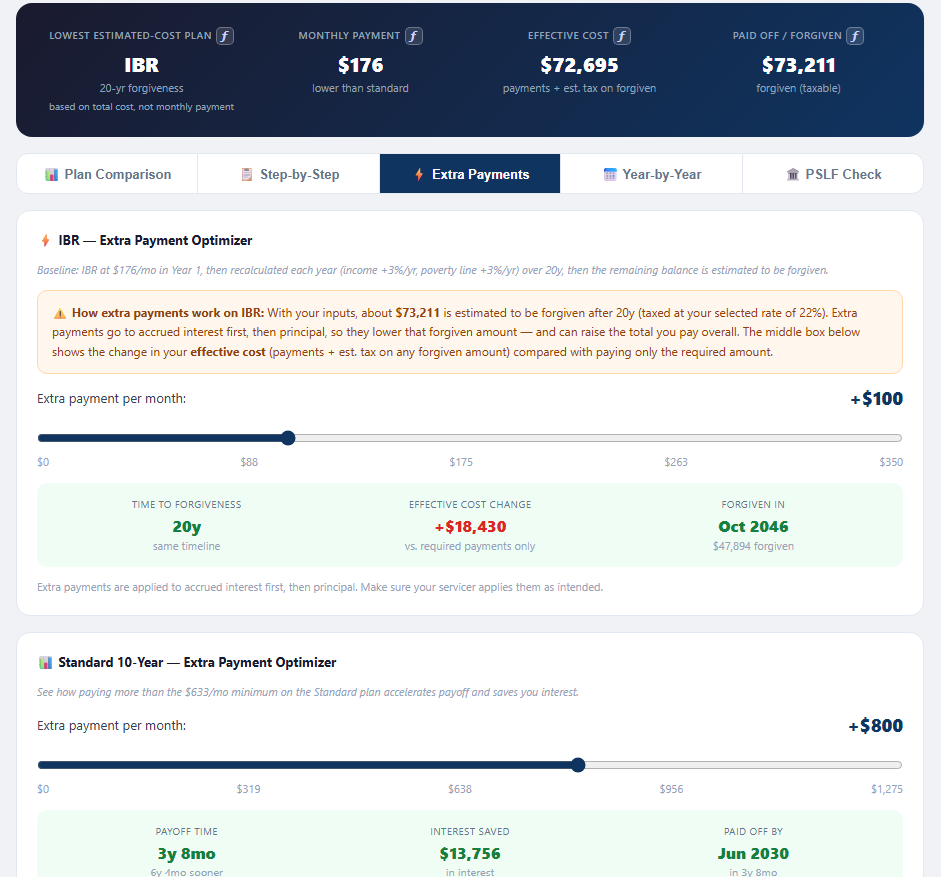
Extra payments optimizer
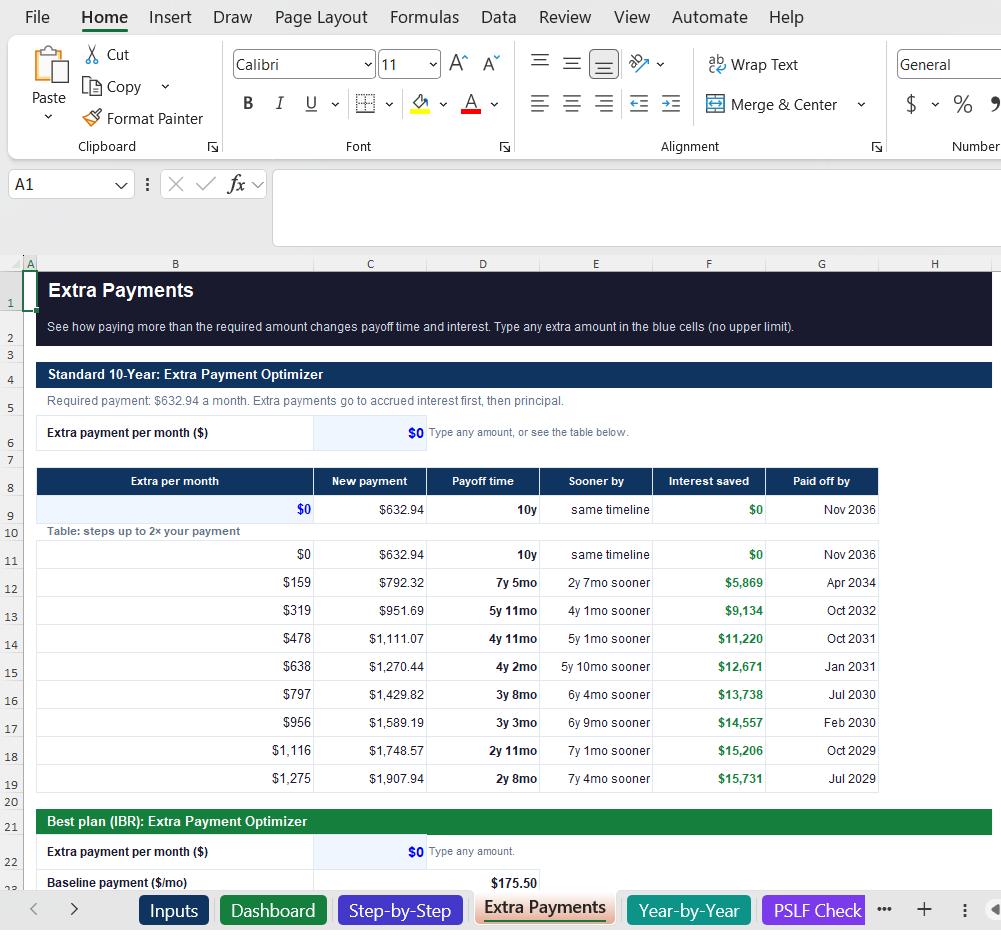
Add $800/mo on Standard: paid off 6 years 4 months sooner, $13,756 interest saved.
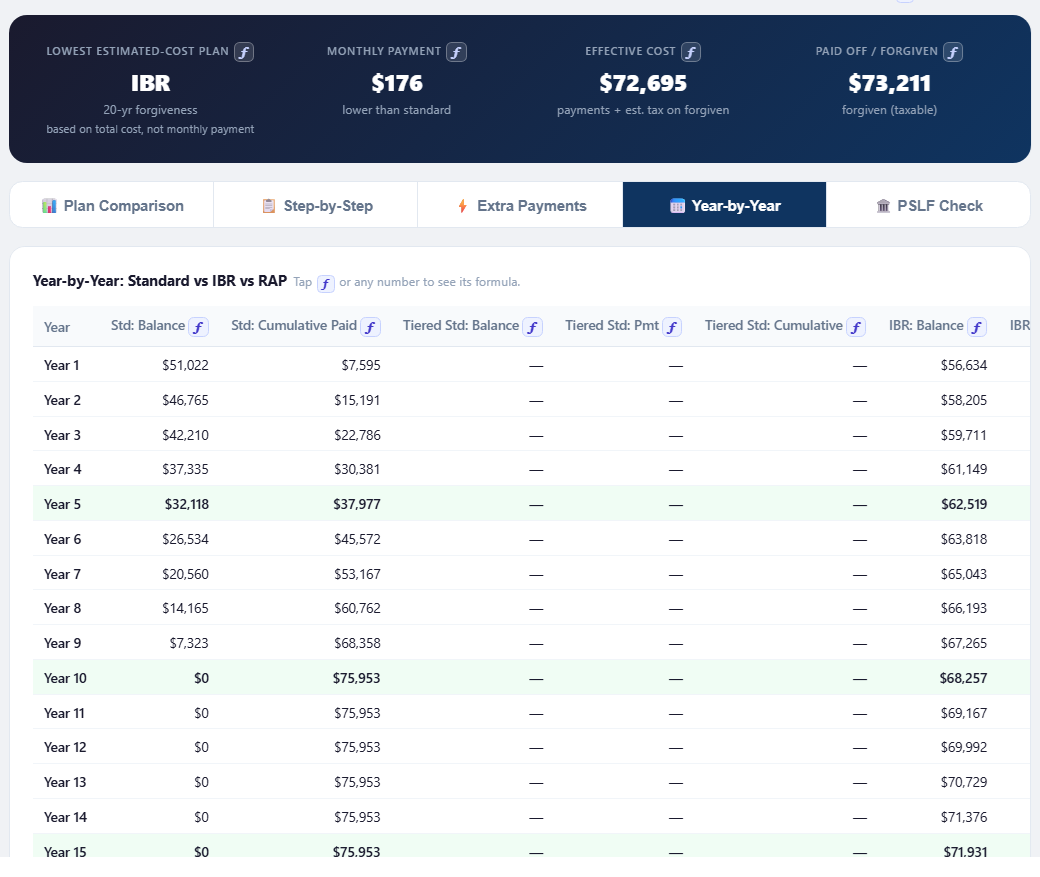
Year-by-year table
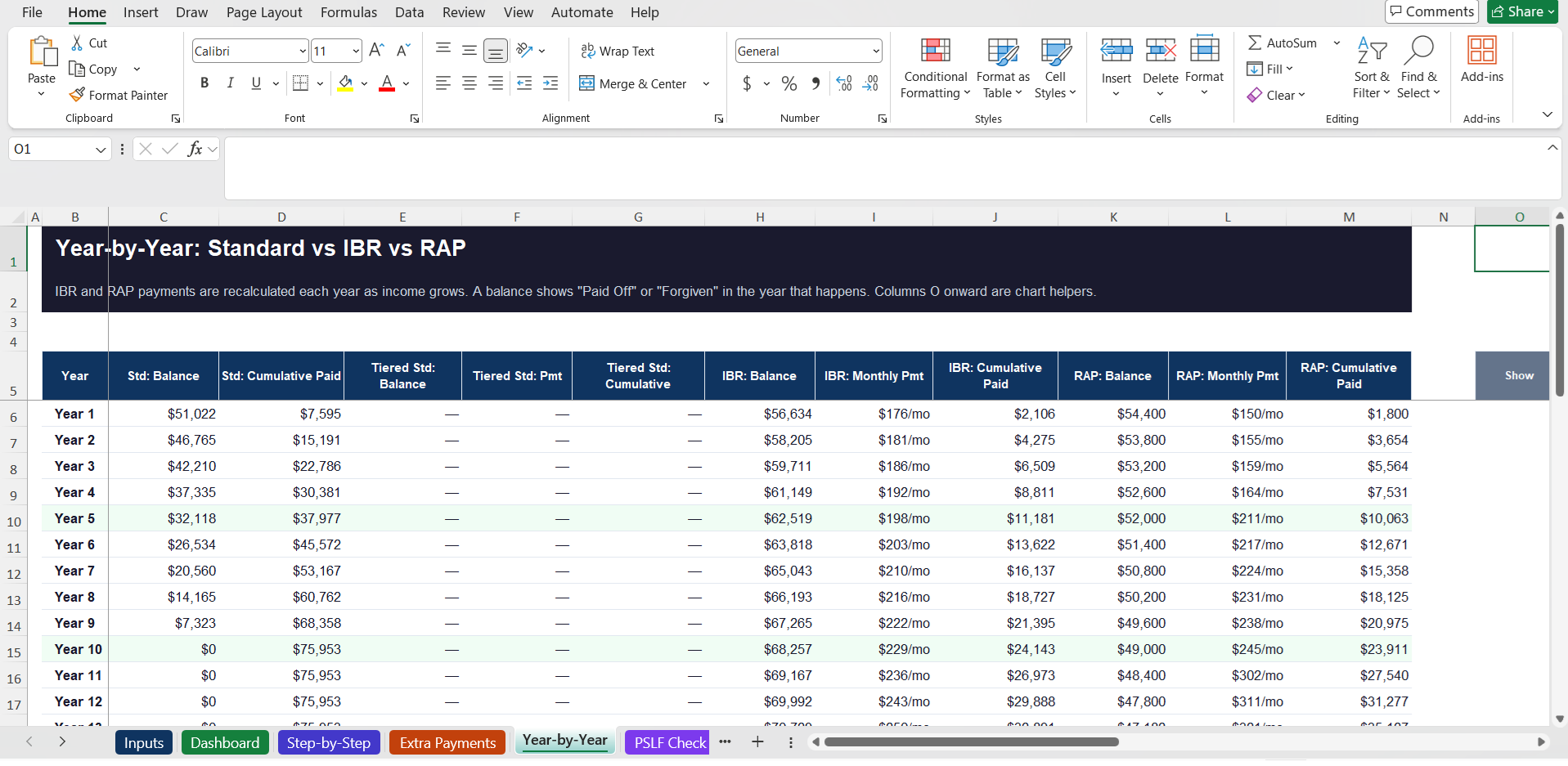
Year by year: Standard is paid off in Year 10, while the IBR balance keeps growing.
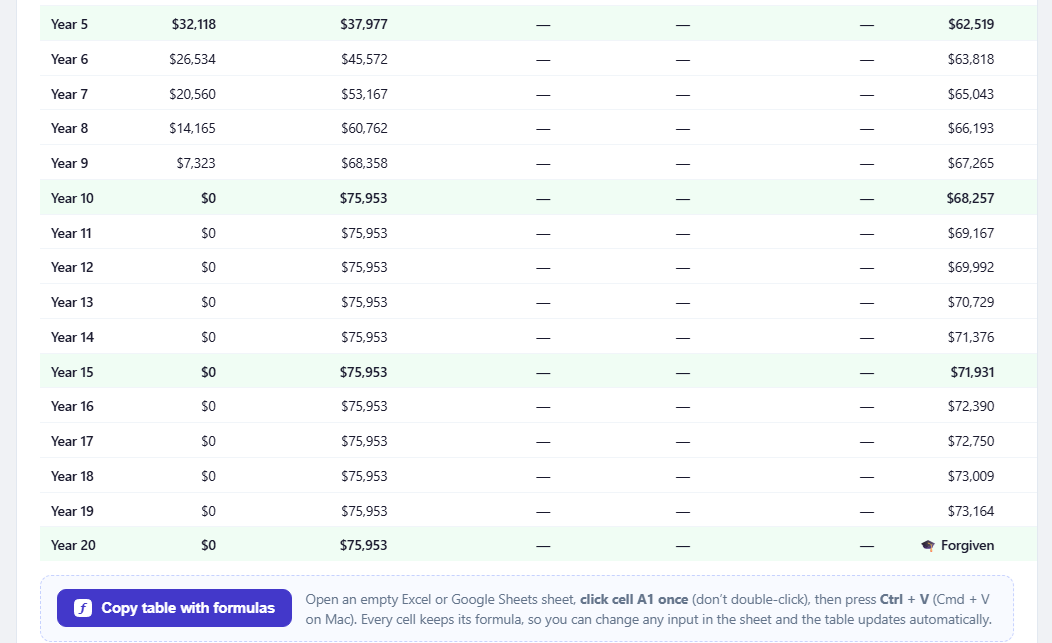
Year 20 forgiveness and copy with formulas
IBR balance forgiven in Year 20. Copy the table to Excel or Google Sheets as a live sheet — change any input there and the table updates.
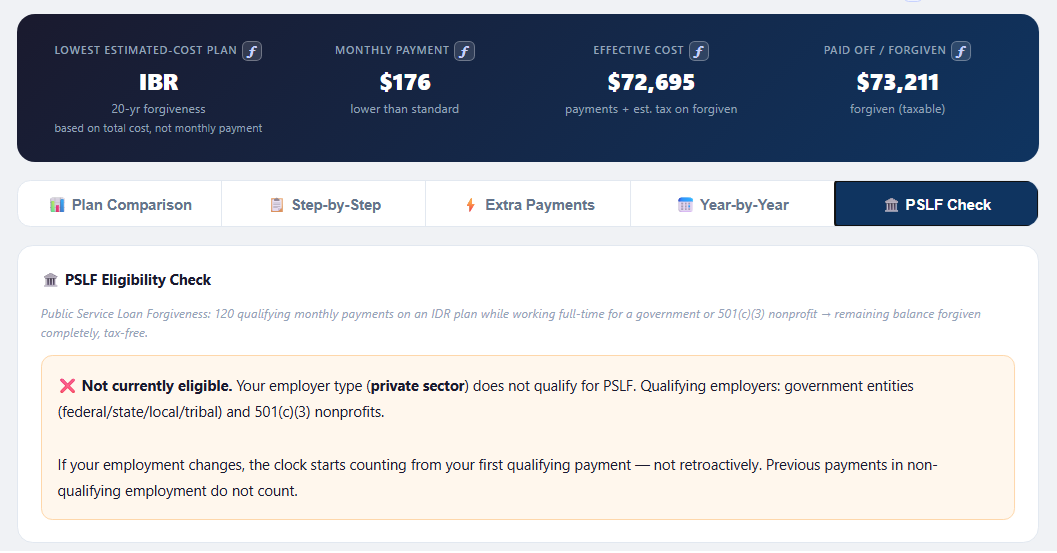
PSLF check
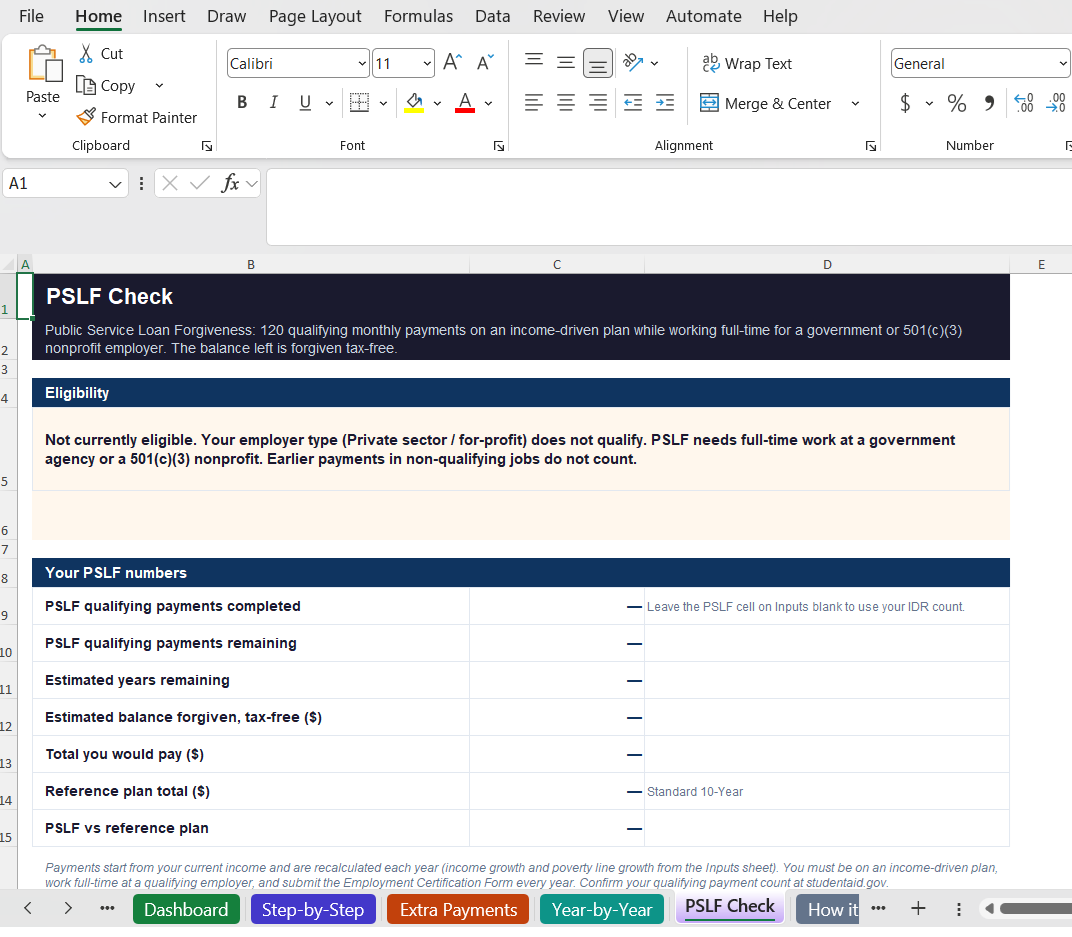
PSLF check: see whether your employer type qualifies for tax-free forgiveness.
Also included · Excel workbook

The same calculator, as an Excel file you keep

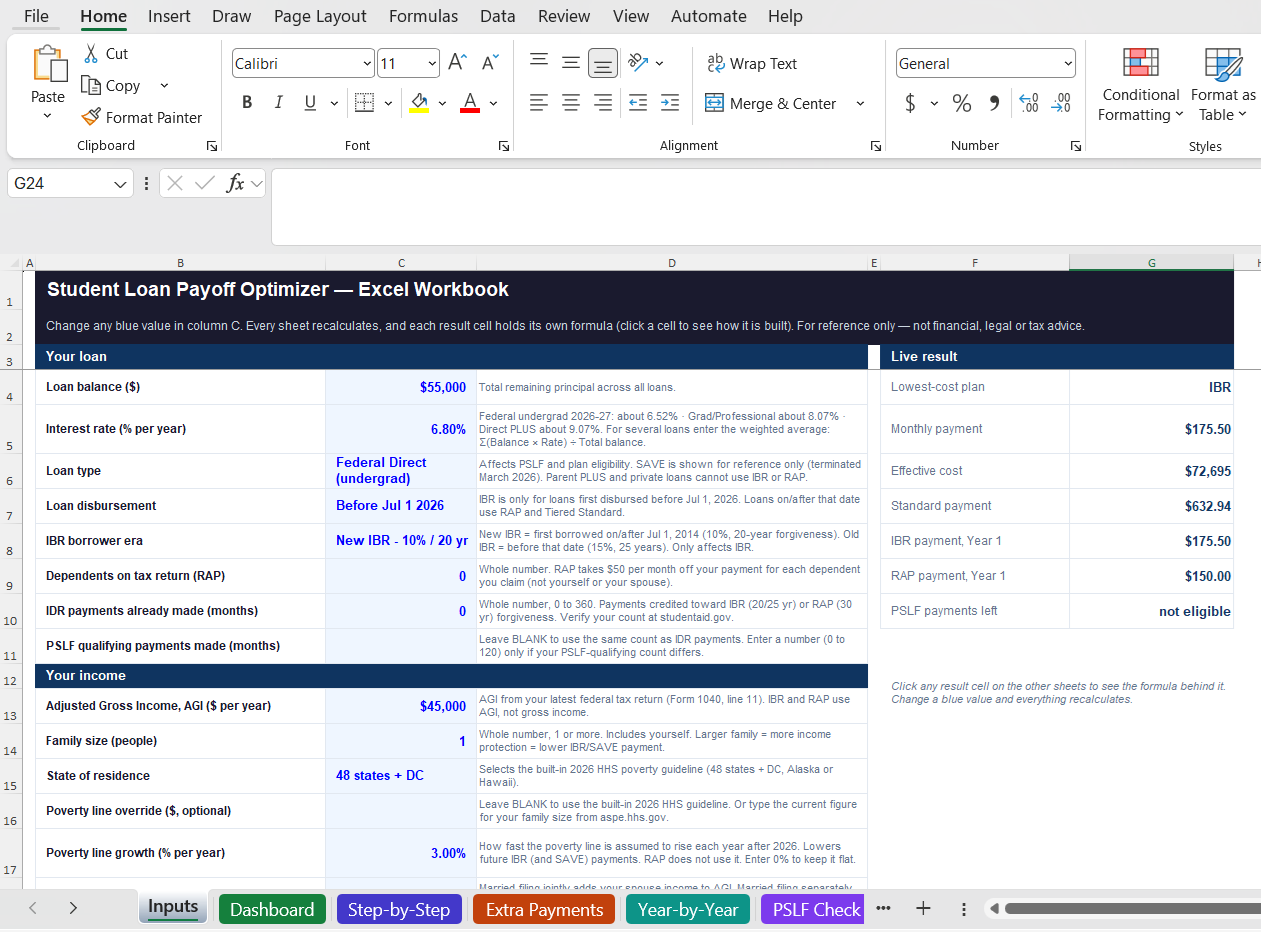
Excel workbook — Inputs sheet with the live result beside the inputs
InputsChange any blue cell — the live result beside it updates right away.
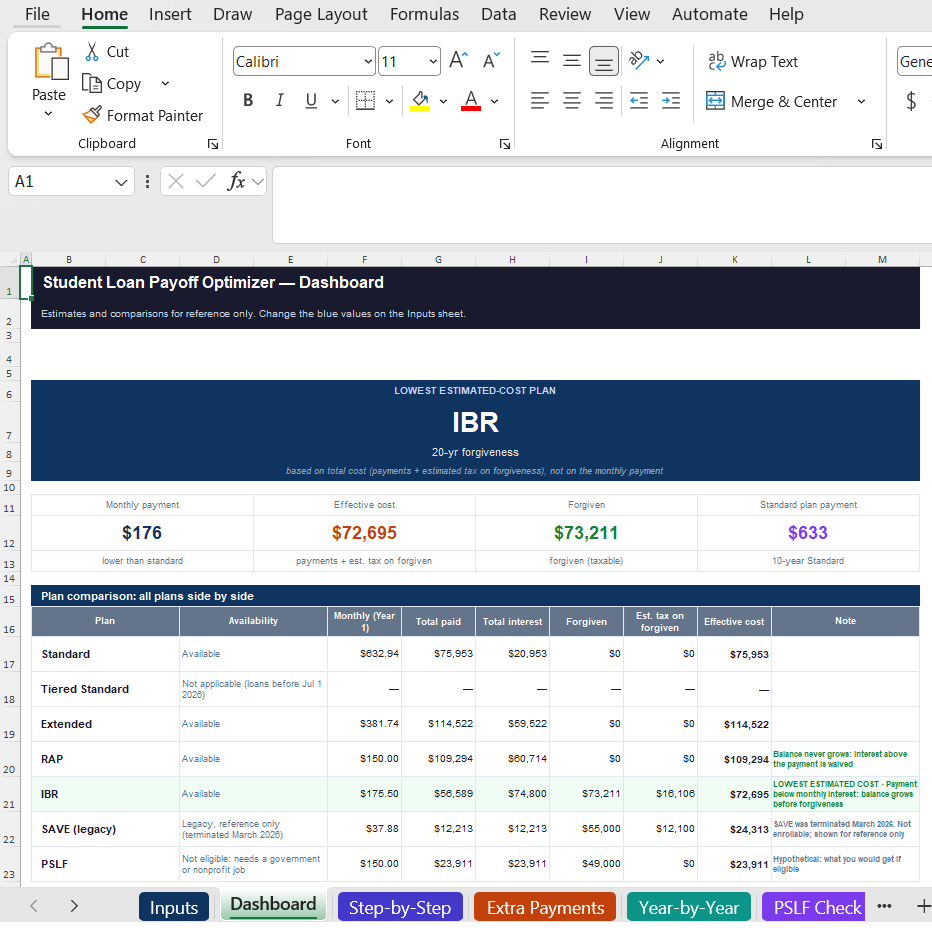
Excel workbook — Dashboard with the lowest-cost plan and every plan side by side
DashboardLowest estimated-cost plan, and every plan side by side — IBR at $72,695.
Excel workbook — Step-by-Step math for the Standard and IBR payments
Step-by-StepHow each payment is built, line by line — click a value to see its formula.
Excel workbook — Extra Payments table with payoff time and interest saved
Extra PaymentsType any extra amount — see how much sooner you pay off and the interest saved.
Excel workbook — Year-by-Year balances for Standard, IBR and RAP
Year-by-YearStandard, IBR and RAP balances year by year — Standard paid off in Year 10.
Excel workbook — PSLF Check with eligibility and PSLF numbers
PSLF CheckCheck whether your employer type qualifies for tax-free PSLF forgiveness.

…and more: RAP and SAVE (reference) step by step, an extra-payment optimizer for your best plan, IDR forgiveness in the year-by-year table, plus a built-in "How it works" guide.

Tap a picture to see it full size.

What's inside

A complete view of your repayment options

Compare every plan side-by-side — with your actual income and loan details. All of this is in both the web app and the Excel workbook.

⚡

Instant Verdict

See which plan has the lowest estimated cost — with estimated monthly payments and total cost based on your numbers.

📊

Plan Comparison

Standard, Extended, IBR and RAP side-by-side — plus SAVE for reference, so you can see the full picture.

🏛️

PSLF Eligibility Check

See if you may qualify for Public Service Loan Forgiveness — estimated forgiven amount and 120-payment countdown.

💸

Extra Payment Optimizer

Slide to add extra monthly payments and see how much sooner you pay off — and how much interest you save.

📅

Year-by-Year Table

Projected balance under each plan with modeled income growth — see forgiveness year highlighted.

📋

Step-by-Step Breakdown

Full formula walkthrough for Standard, IBR and RAP (plus SAVE for reference) — so you understand exactly how each payment is calculated.

Inputs

Every input that matters, already laid out

Adjust each input to your own situation — your loans, income, family size and state — and see how each scenario plays out. The same inputs are already laid out in both versions — nothing to set up.

🎓 Loan details

  • Loan balance & interest rate
  • Loan type (Undergrad, Grad PLUS, Parent PLUS, Private)
  • Loan disbursement date
  • IBR borrower era
  • Dependents on tax return
  • Employment type (for PSLF)
  • Payments already made (IDR & PSLF)

💰 Income & options

  • Adjusted Gross Income (AGI)
  • Family size & state of residence
  • Filing status & spouse income / loans
  • Income growth rate (%/year)
  • Projection period (years)
  • Forgiveness tax rate
  • Federal Poverty Line override
See the math

Change any value. See how it's calculated.

Both versions start with typical values already filled in — type over any of them, and check how each result is worked out.

🌐 Web app
✏️

Change any pre-filled value

Loan balance, interest rate, income growth, forgiveness tax rate, poverty line figures — type over any starting value to match your situation.

ƒ

See the formula

Tap ƒ next to a result, a table column or a chart line to see how it's calculated, step by step.

📋

Copy table with formulas

Paste your inputs, the plan comparison and the year-by-year table into Excel or Google Sheets — change any input there and everything recalculates.

📊 Excel workbook Also included
✏️

Edit any blue cell

Change any blue value on the Inputs sheet — every sheet recalculates, and an input check tells you when everything looks fine.

ƒ

Click a cell, see its formula

Each result cell holds its own formula — click it to see how it's built. The Step-by-Step sheet walks through every payment.

📖

Nothing locked

Change or extend any formula. The "How it works" sheet explains each plan and the assumptions behind it.

Yours to keep

Not a one-time result. Your own calculator.

Buy once and use both versions as often as you like — run every scenario you need.

🌐 Web app
🌐

Use it online

Open your link in any browser and start right away.

📱

Install it, use it offline

Install once on your phone or computer, then use it anywhere — even with no internet.

💾

Save as new file

Keep each scenario separately — IBR vs RAP, with or without $200 extra a month.

Desktop & Android
🔗

Share it

Send a scenario to your partner or advisor.

📊 Excel workbook Also included
📁

A file on your computer

The .xlsx is yours to keep — open it any time, no internet needed.

🗂️

One copy per scenario

Save a copy for each case — IBR vs RAP, with or without $200 extra a month — and compare them side by side.

🧩

Open it in the app you use

Microsoft Excel, Google Sheets or LibreOffice.

🔒 No account, no subscription — your data stays on your device.

See what your numbers could mean

Enter your loan and income details and explore estimated repayment costs, timelines, and forgiveness.

$9.99 · one-time payment
Web appExcel workbook (.xlsx)
Get both versions →

🔒 Secure checkout via Gumroad · Card or PayPal · Instant download

Need more than one? Get all 5 calculators for $39.99 →